
.png)
.png)
.png)


What is JotRoom?
JotRoom is a note-taking app for high school and college students seeking to make their note-taking experience more engaging and useful by adding all kinds of notes (example: photograph of written notes) in their work space.

Targeted Users

For high school and college students, they are looking for more advanced note tools so they can have an improved studying experience.

The Goal
My goal was for students to include JotRoom as part of their useful study tool in school. Growing up, I only had my physical note book and pen to write my notes before a test. I wanted my experience of studying to feel more enjoyable.
User Personas


“My friend/classmate can’t show up to class today, so I want to find a way to share my notes with them and maybe even annotate on it too.”
“My goal is to keep my notes organized and work smoothly with classmates so we can all stay on track for our assignments and tests.”
Nina, 17 years old
Paris, 22 years old

“My final exam for Chemistry is around the corner, and I need to find an app to take notes and study on.”
Derek, 16 years old

"I photographed my friend's notes from history class, but his handwriting is a little messy. I need something to scan these words clearly."
Jed, 20 years old
Empathy Map

Paris, Empathy Map
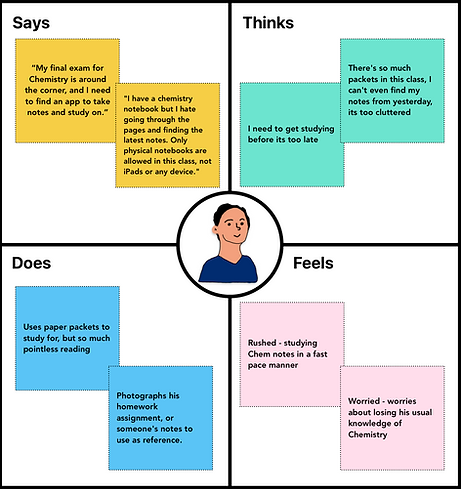
Derek, Empathy Map
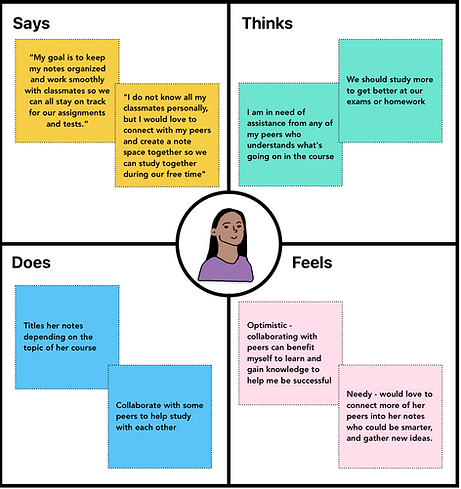
Nina, Empathy Map

Jed, Empathy Map

What we know
After gathering our persona's goals, needs, behaviors, frustrations, and pain points. We jot down our user insights and our solutions to further access ourselves to designing the prototype.
Design Plan

I created a thinking map based on the insights I gathered from our personas to ensure a variety of solutions to everyone's needs or goals.
Design Process

Low-Fi (Layout & User Flows)
.png)
.png)
Paris' user flow showcases her user journey to sharing note with her peer.
Nina creates a new note and puts a title of her course to ensure organization.
.png)
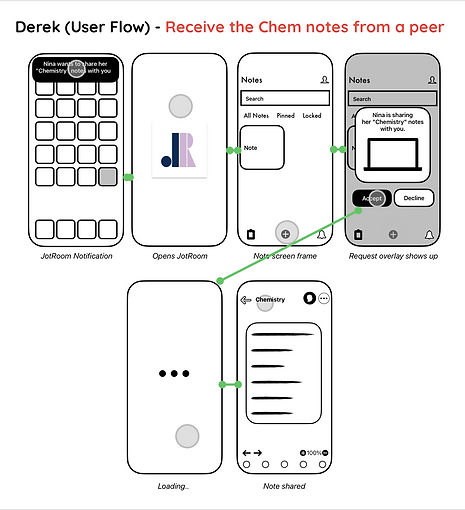
Derek accepts Nina's invitation to her notes since he needs Chemistry notes for his upcoming exam.
.png)
Jed scans his photographed notes using the "Scan & OCR" tool to scan the words of the handwriting.
.png)
Main Screens

Grayscales

Mid-Fi (Grayscales)
By using Figma, I designed our grayscales based on our low-fi sketches. The point of these grayscales are to help assist the layout and structure for the app before heading into visual details. That way, we can build up our design more intuitively.


Write on your notes

Capture handwritten notes with OCR

Collaborate and share

Review & Thoughts
What Went Well:
-
My personas show relatable goals.
-
Listing the needs for users based on my research insights.
-
Starting from paper before heading into Figma.
-
Coming up with innovative UI solutions (OCR, Sharing Notes, Handwritten Notes).
What Did Not Go Well:
-
Not much in depth into user testing.
-
Redoing the low-fidelity sketches every time.
-
Time constrictions (getting stuck on low-fidelity wireframes for a long time).
CUNY Lehman College
Student Thesis Exhibition 2025

My thesis project "JotRoom" was displayed in CUNY Lehman College's Thesis Exhibition 2025

JotRoom display

App Store Layout
![FeelPeace_FINAL Main Logo [Color 2].jpg](https://static.wixstatic.com/media/32d0d2_8d0e7870511f450ba62824d7f3a97610~mv2.jpg/v1/fill/w_72,h_73,al_c,q_80,usm_0.66_1.00_0.01,enc_avif,quality_auto/FeelPeace_FINAL%20Main%20Logo%20%5BColor%202%5D.jpg)
